

Playing the game with your friends is a fun on a different level that we cannot feel if the same friends are watching your gameplay. Many players asked the same question: Is The Sims 4 multiplayer or not? The straight answer is that it does not support it, but you can use a mod to bring it to the game. The most popular mod is The Sims 4 Multiplayer Mod (S4MP), created by SimsMultiplayer and downloaded 2.9M times.
The installation is simple; you just have to run the launcher, but the twist came during configuration that require your attention. Many people just install the mod and start arguing it’s not working, so please carefully read and follow each step to avoid any errors.
What’s New in v0.77.1 (November 16, 2026)
- Updated for the game patch 1.129.39
- Fixed the career branch selection dialog not showing upon promotion
- Fixed updating kingdom titles for client players
- Fixed enacting decrees for client players.
Download S4MP
If you want to download the Windows or MAC version, click on the buttons below. These links are from the creator’s official CurseForge profile. The download size is 137.7 MB, so it can take some time depending on your internet speed.
“This mod is not compatible with the PlayStation and Xbox.”
How to Install and Use the Sims 4 Multiplayer Mod?
First, make sure all the players have the latest game version installed, and everyone has the same mods, expansion packs, and custom content. Otherwise, you can disable them via the app with one click. Meanwhile, everyone must enable Mods & Scripts, then save & exit the game. This mod allows up to 12 players.
- Download and Run the Mod
Download the mod from the links above, run the app, and allow network permissions and access through Windows Firewall.
- Put all the Sims in one house
The host will start a new game, create the Sims 4, and put them into one house, then save and close the game. Share that saved file with every player.
- Set file paths
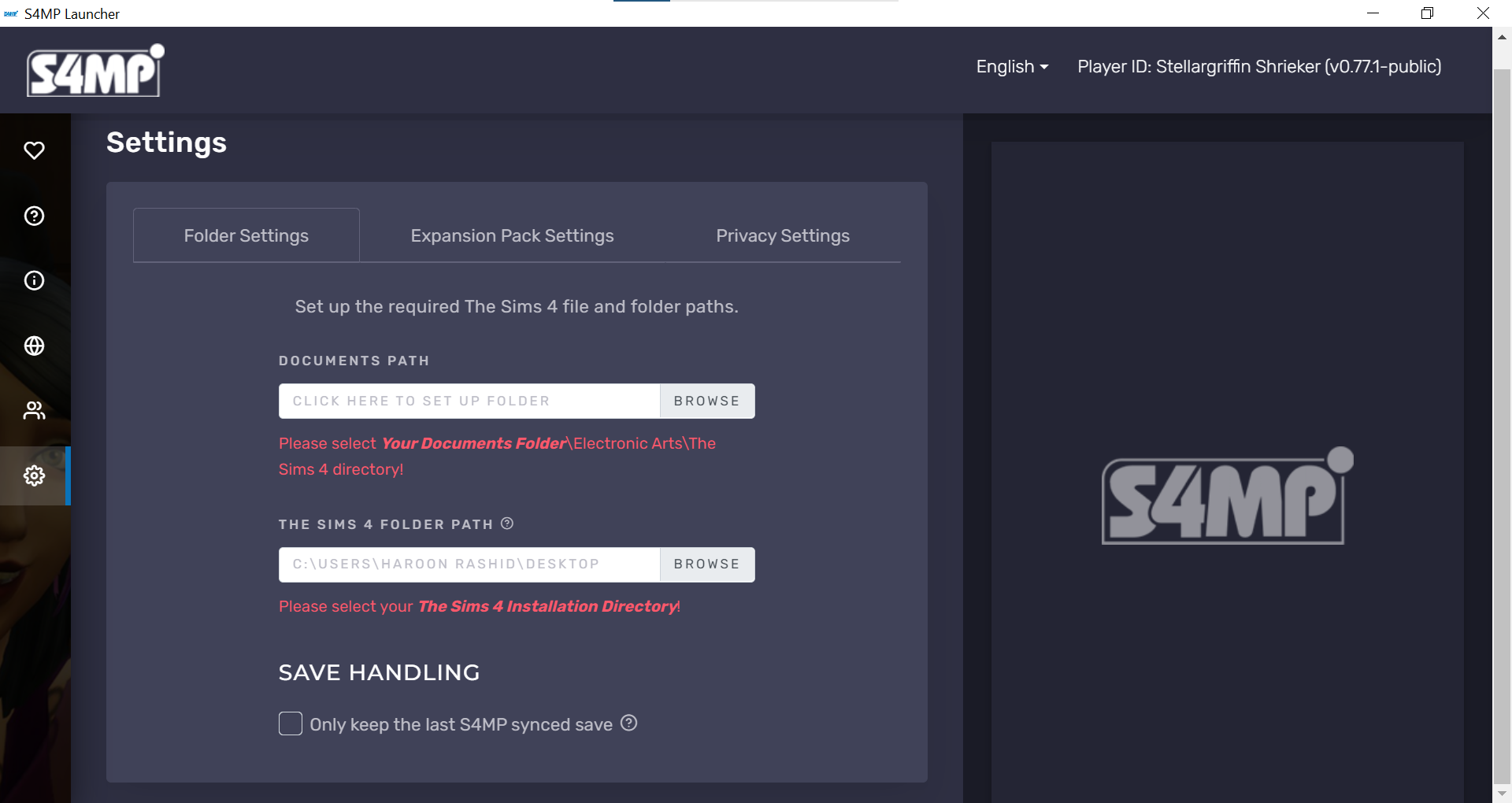
Now open the S4MP app and in the settings>Folder Settings, setup required Sims 4 file path. For the documents path, select Your Documents Folder\Electronic Arts\The Sims 4, and for the folder path, select the installation directory of the game.

- Setup Network
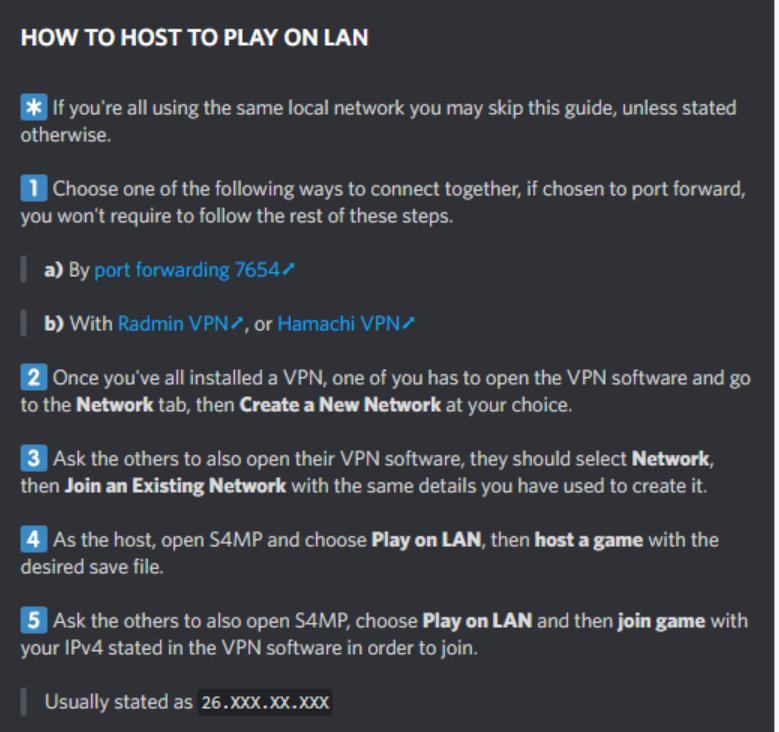
Download and install Radmin VPN (for everyone). If you are on the same network, you can skip this. Then the host opens this app, clicks Network > Create Network, and makes up a room name and password. Friends click Join Network and type in that exact name and password.
- Configure the LAN
The host should launch S4MP, choose Play on LAN, select the save created in Step 2, then click Host Game. S4MP will display an IP address. Each friend can join by opening the app, selecting Play on LAN, entering that address, and clicking Join. The app will then transfer the host’s save to the other players’ computers automatically.

- Start the game
Once everyone’s status says “Synced,” the Host clicks Everyone’s Connected and Start Game. Everyone opens The Sims 4, loads that exact save file, and moves into the house together. A notification in-game should state that the multiplayer has loaded.
Important: While the Sims 4 only allows upto 8 sims in households but you can increase the limit by downloading the MC Command Center via official Deaderpool's website.
Can we play Online with Friends?
Yes, you can directly play it online with your friends without setting up the above-mentioned settings. But you need to support the creator through the Patreon Membership. You will get early access to the latest updates, including reworked traveling, build mode support, an improved launcher, gameplay bug fixes, and more. And enjoy additional benefits as an S4MP supporter.
FAQs
Yes, the public LAN version is free and needs no login.
Up to 12 people can play together, including the host.
Not as far as the official downloads go. The launchers are Windows and Mac only.