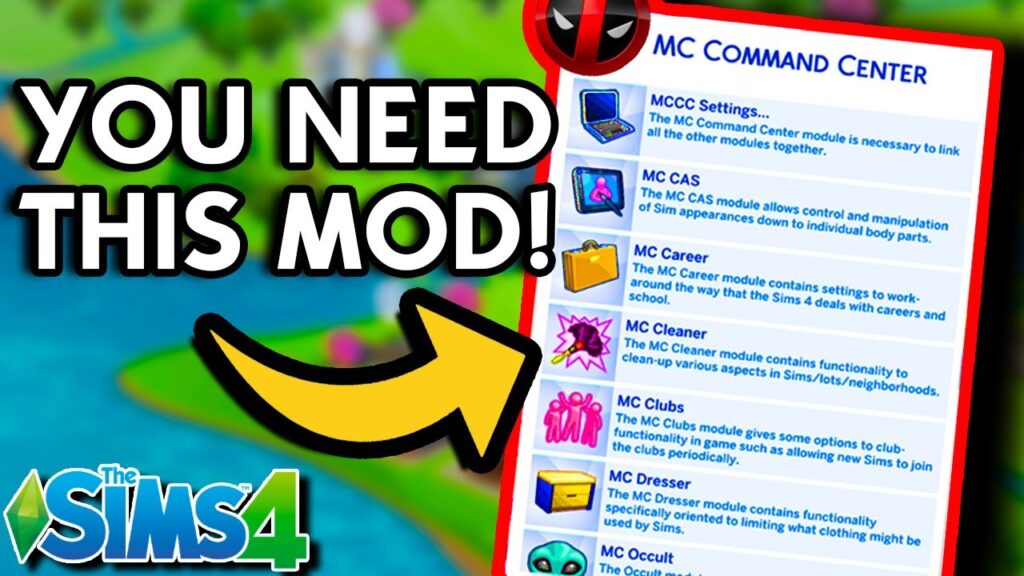
The MC Command Center Sims 4 is a script mod that gives you more control over NPC story progression. Once installed, it adds several options to your game’s interface. For example, the MC Career module includes settings that let you customize how careers and school systems work. You can download the latest version of MCCC, 2026.5.0, below. It is fully compatible with the new patch 1.127.41.
What Is MCCC?
It is a popular mod developed by Deaderpool to give more customization and control over Sims, households, and the overall world. This toolkit allows you to use cheats, manage story progression, NPC behavior, population settings, kill, delete, or rename Sims, and more through the in-game menu with a single click.
What’s New in 2026.5.0
- Resolved an issue with GEDCOM individual output that was accidentally introduced in version 2026.4.0.
- Fixed a rare problem that could occur when an older Sim died of old age, and MCCC moved orphaned Sims into other households to prevent them from being removed from the game.
- Made several adjustments to the MCCC menus available through Sims, Relationship panels, and computers. Some players were experiencing issues where the MCCC menu would disappear, appear more than once, or otherwise behave unexpectedly. Since the problem could not be reproduced consistently, even with affected save files, these changes are intended to improve menu reliability and may also address conflicts related to the Mod Marketplace feature added by EA.
- Fixed the auto-save notification so it no longer appears when the notification option has been turned off.
- Added a new Manual Confirmation option for random marriages created by MCCC. You can find it under MCCC > MC Pregnancy > Other Marriage… > Manual Confirmation. When enabled, MCCC will ask for confirmation before completing each randomly generated marriage. The marriage can still fail afterward if the Sims cannot be moved into the same household. This option is turned off by default.
- Added a similar Manual Confirmation setting for random pregnancies under MCCC > MC Pregnancy > Other Pregnancy… > Manual Confirmation. When enabled, the game will ask for approval before MCCC completes a randomly generated pregnancy. This applies only to pregnancies created by MCCC’s random pregnancy system and does not affect Neighborhood Stories, manually initiated pregnancies, or other pregnancy methods. The option is disabled by default.
- Fixed the MC CAS > Set Body Part feature for occult Sims, which was still not working correctly. The functionality has been repaired once again.
Download MC Command Center Sims 4
You can download all modules of the MC Woohoo and Command Center through the download buttons below. These files are compressed in 7-Zip, and the file size is only 2.1 MB, so it will not take you much time.
Note: We do not host / share any pirated mods; the above links are officially shared by deaderpool on his website.
How to install this mod in Sims 4?
The Installation and activation are straightforward; just download and place the extracted files in the Mods folder. Don’t understand? Follow the steps below:
- Download
Download the zip archive from the buttons above.
- Extract
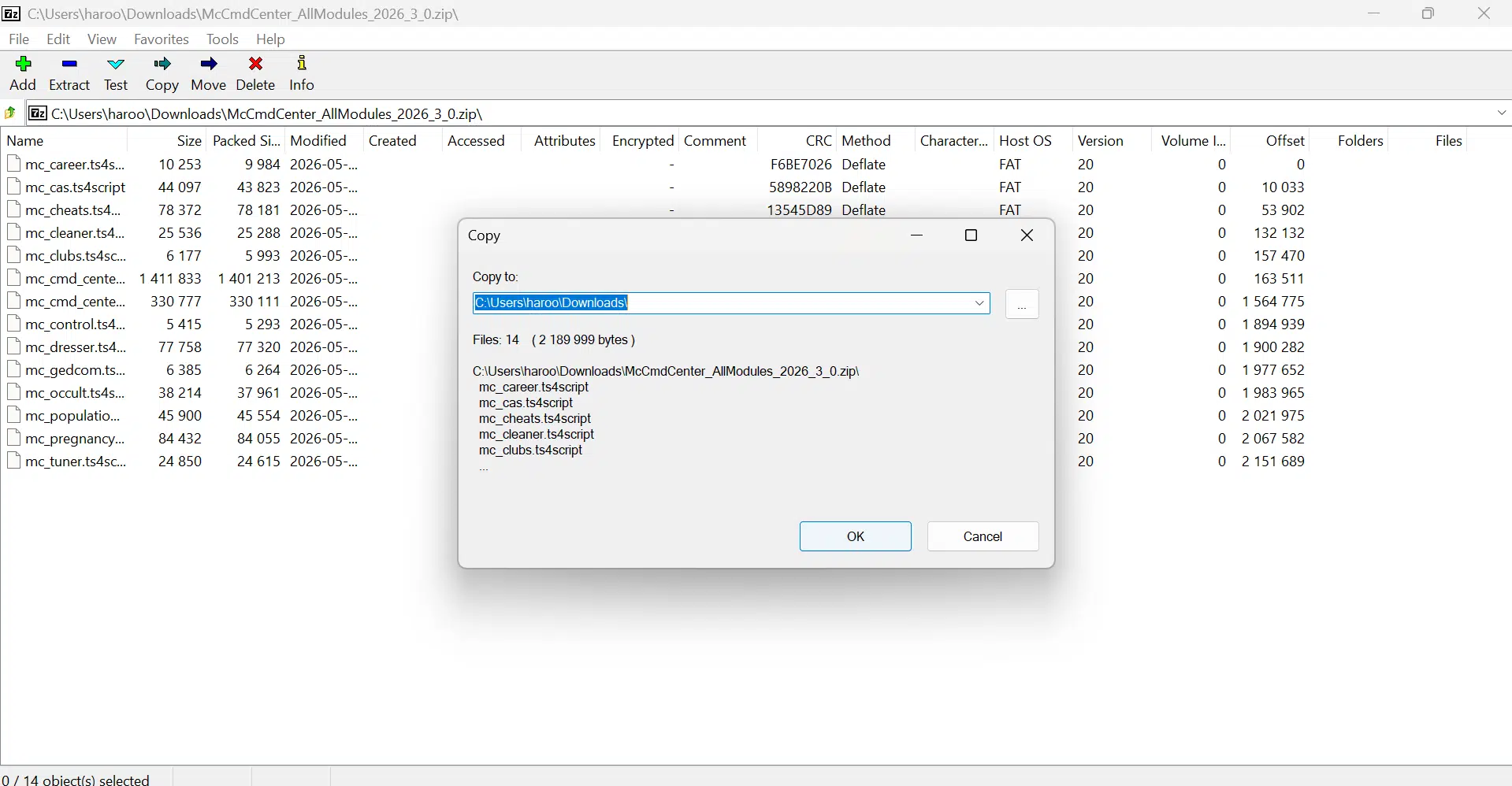
Extract the zip files with 7-Zip or WinRAR software.

- Move Files
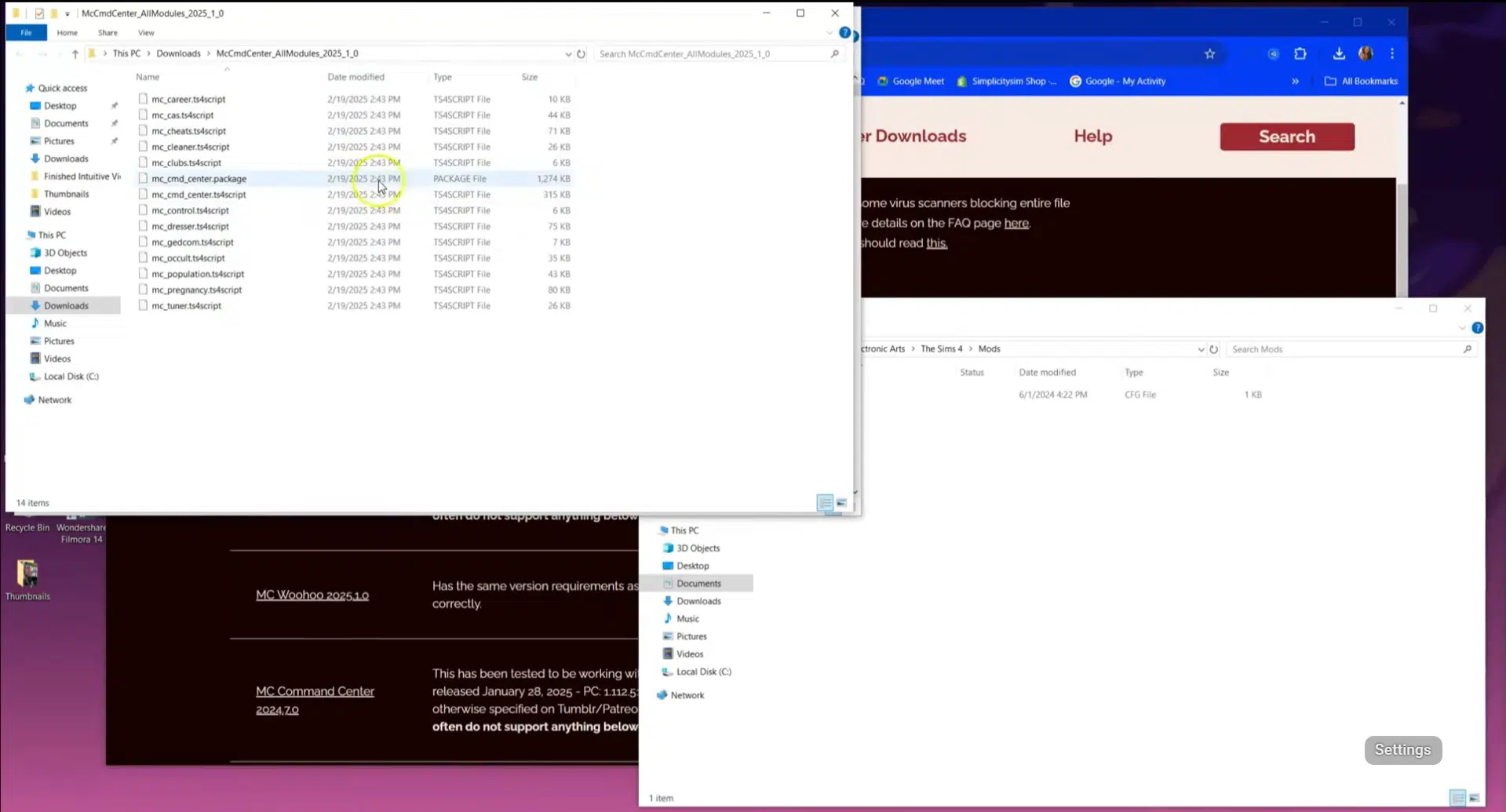
Now, copy all the files and paste them into
Documents > Electronic Arts > The Sims 4 > Mods.
- Enable Mods
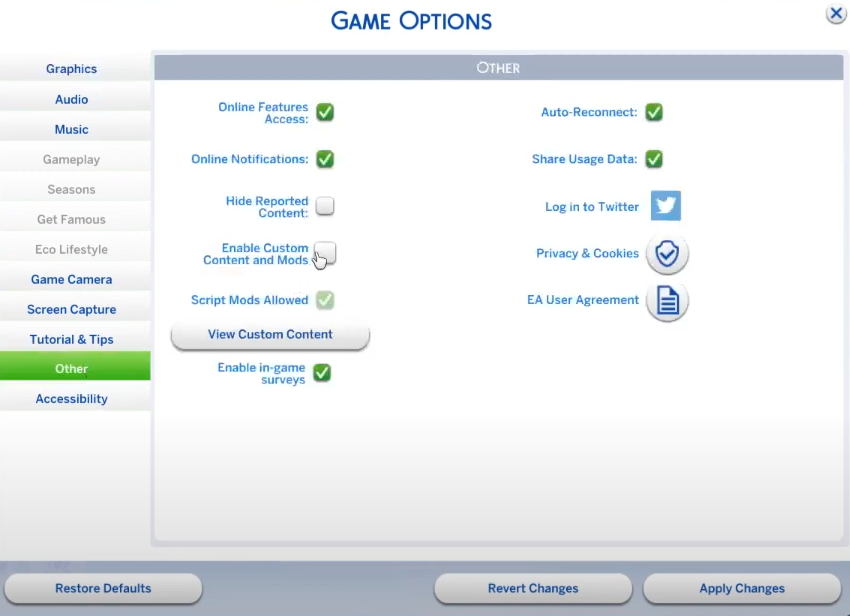
Run the game and enable “Custom Content and Mods” and “Script Mods Allowed” from the game options.

- Restart
Restart the game for changes to take effect. At the next start, you will see the list of mods that are currently active.
How to use the MC Command Center
- Run The Sims 4 and start a new game or load an existing one.
- Click on the Sim and click on MC Command Center at the top center.

- Choose the mod or cheat that you want to use & enjoy.

Key Features
Base Module
It is required for all other modules to function and display properly. It allows access to settings and commands through in-game computers, mailboxes, or Sims, and enhances gameplay with story progression and cheat replacements.
Story Progression
It adds dynamic progression for unplayed Sims and enables autonomous marriages, pregnancies, career changes, and household moves, mimicking The Sims 3’s story progression.
Global Settings Control
It is used to adjust in-game mechanics like lifespan per age stage, relationship decay rates, and time speed, and notification settings (e.g., aging/death notifications for played Sims only).
Cheat Simplification
It replaces the cheat codes system with a modern one-click activation system. For Example, if you want to use the money cheat, just click on Add Money and enter the amount (999999 max.), and the amount will be credited to your account.
Key Modules and Their Features
Here is the list of all modules and their features that I use in the game.
MC CAS (Create-a-Sim)
This module lets you customize your Sims’ appearance, like hair, makeup, or accessories, without having to enter Create-a-Sim. It also gives you control over the body shapes and sizes of townies, so you can prevent random weight or muscle changes over time. You can fine-tune genetics by setting what children inherit from their parents, and even blocklist certain traits for Sims or pets to avoid unwanted assignments.
MC Cheats
With MC Cheats, you can instantly modify things like motives, emotions, skills, and careers. It also allows you to add satisfaction or business points, reset broken Sims, and adjust household funds with a few clicks. You can auto-enable handy cheats like Full Edit CAS or build/buy cheats, and even trigger random events or change lot traits without using cheat codes.
MC Cleaner
This tool keeps your game tidy by fixing common annoyances—like syncing last names for married Sims, removing stray accessories from outfits (like glasses in the shower), or properly deleting culled Sims. It helps reduce clutter and can make your game run more smoothly overall.
MC Career
The career module lets you promote or demote Sims instantly, switch career branches, or tweak employment rates by age group. For example, you can help more teens or elders get jobs. It also gives you control over homework speed, vacation days, and job difficulty settings for both played and unplayed Sims.
MC Clubs (requires the Get Together expansion)
This module expands the club system by increasing the number of allowed members and offering better management tools. You can monitor club activities and control memberships more effectively than the base game allows.
MC Occult
If you play with vampires, aliens, or spellcasters, MC Occult gives you detailed control over how these Sims behave. You can adjust skill progression, enable or disable specific interactions, and even allow features like risky vampirism to spread the condition more organically. It also lets you force Sims to reveal their true form on command.
MC Population
This module helps you control how many Sims exist in each life stage (child, teen, adult, etc.) across your game. You can stop the game from filling your carefully designed houses with random NPCs and fix awkward townie outfits, especially if you use a lot of custom content.
MC Pregnancy
Here, you can manage every aspect of pregnancy in the game—from forcing pregnancies and setting baby gender to enabling teen parenting. You can also control breakups by deciding who moves out, how custody is handled, and even applying child support. There are also inheritance rules you can tweak for extra realism.
MC Dresser
This module lets you fine-tune outfits globally or on a Sim-by-Sim basis. You can stop Sims from randomly changing into ridiculous clothes and maintain a consistent look across your world, including NPCs.
MC Tuner
Tired of your Sims constantly drinking water or kicking dollhouses? MC Tuner allows you to disable annoying behaviors like these. It also helps you control phone notification spam or turn it off entirely if you’re aiming for an off-the-grid experience.
Many players are confused about whether this mod is an alternative to UI Cheats or not, and both can be used together.
Although some features are similar, the two mods serve different purposes. Here is the side-by-side comparison:
MCCC vs UI Cheats Extension
| Feature | MC Command Center | UI Cheats Extension |
|---|---|---|
| Primary Purpose | Advanced gameplay management and automation | One-click cheats directly through the game interface |
| Ease of Use | Moderate learning curve with many menus | Extremely easy, click or right-click UI elements |
| Story Progression | Yes, automatic marriages, pregnancies, population management | No |
| Population Management | Yes | No |
| Pregnancy Control | Yes | No |
| Marriage Settings | Yes | No |
| Household Management | Yes | Limited |
| CAS Editing | Yes | Limited |
| Career Management | Yes | Yes |
| Skill Editing | Yes | Yes |
| Relationship Editing | Yes | Yes, faster through the relationship panel |
| Needs Editing | Yes | Yes, drag or click needs bars |
| Money Cheats | Yes | Yes, click household funds |
| Moodlet Removal | Limited | Yes, remove with a right-click |
| Aspiration Progress | Yes | Yes, complete goals with one click |
| Trait Management | Yes | Limited |
| Time & Season Control | Yes | Yes |
| Fame & Reputation | Yes | Yes |
| University Grades | Yes | Yes |
| Clubs, Perks & Occults | Yes | Yes |
| Automation | Extensive automation and customization | No automation |
| Best For | Players who want deep control over the entire game | Players who want quick cheats without typing commands |
| Performance Impact | Higher due to many background systems | Very lightweight |
| Can Be Used Together | Yes | Yes, both mods are fully compatible and complement each other |
Also Check: Sims 4 Tray Importer
MC Woohoo (optional, separate download required)
MC Woohoo adds depth to romance and pregnancy gameplay. It includes options for risky Woohoo, relationship dynamics, and more advanced control over how Sims connect romantically.
MC GEDCOM
For players who love managing family trees, this module helps you view, export, or manipulate genealogical data more easily within the game.
Fixed: script mod not working
If this mod is not working on your end, here is how to fix it.
- Download the latest version after the new patch. The latest supported version is 1.127.41.
- Make sure that your files are not placed in subfolders.
- Clear the game cache by deleting the
localthumbcache.packagefile. - If the issue still exists, tell me in the comment section in detail; I will try to assist you.
Final Thoughts
This isn’t just a tool; it brings new life to the game. When you’re feeling bored, enable it and explore features like teleporting or turning them into ghosts. You can also increase money, change clothes, or make a Sim pregnant. Take full control of their lives like a dollhouse with the MC Command Center. If you want to try out the beta version, you can join the Deaderpool on Patreon.
If you love to use mods like me, you should also try the Click Cheats and Slice of Life, as they are most popular among the players.
Frequently Asked Questions
It lets you control almost every aspect of Sims’ lives, including pregnancy, money, relationships, autonomy, and cheats, all from one menu.
Yes, it’s entirely free to download.
Go to MC Command Center > MC Pregnancy > Start Pregnancy, then select the partner. The Sim will become pregnant instantly.
Yes, this mod is compatible with Mac and works smoothly.
Also Check: Sims 4 Challenges
Note: We are not affiliated with Deader Pool; all the information here is just for Educational purposes.