Close Menu

    Subscribe to Updates

    Stay updated with the latest gaming news, tutorials, and how-to guides from Gamuters.

    What's Hot

    How to Check Telenor Answers?

    December 16, 2025

    How to Register yourself for PMWR Tournament? Complete Guide

    December 15, 2025

    PIG Meme Coin Turning Satire Into Market Cap

    December 11, 2025
    Facebook X (Twitter) YouTube WhatsApp
    Wednesday, 24th December 2025
    Facebook Telegram X (Twitter) Pinterest
    GamutersGamuters
    • Telecom
    • Downloads
    • Gaming
      • PUBG Mobile
      • The Sims
    • Contact
    Subscribe
    GamutersGamuters
    Home»Blog»PUBG introduced ‘Super Smooth’ graphics in Update 4.0
    Blog

    PUBG introduced ‘Super Smooth’ graphics in Update 4.0

    Haroon RashidBy Haroon RashidAugust 13, 20252 Mins Read
    Share Facebook WhatsApp Twitter Reddit Pinterest Telegram Email

    Krafton is the current developer of PUBG Mobile, working not only to add new features and items but also to provide a smoother gameplay experience. I remember in Season 17, when I used to play the game at 20 FPS, some modders created and distributed a config file that removed the grass and made the game run smoother. Although it was against the game’s terms, it was definitely worth it. Now, PUBG has introduced super smooth graphics to reduce lag, especially when your device heats up.

    The super smooth graphics are currently in beta, where developers will test them and gather public feedback, just like they did with Livik. It’s not easy to make these graphics compatible with all devices, but we will test them in the beta version before the official release. In PUBG Beta 4.0, you can try these graphics settings by going to Settings > Graphics and selecting your preferred FPS and graphics options, such as Smooth, HDR, and more.
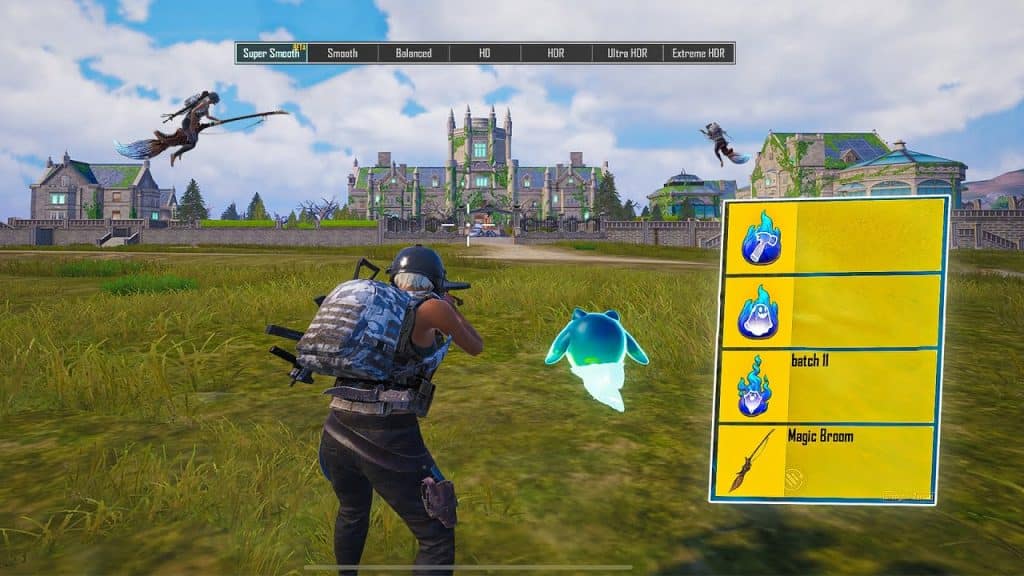
    Image showing PUBG Mobile 3.9 update release date with new features
    Image via PUBG 4.0 update

    Before, in version 3.2, they added 120 FPS support for high-end devices, and later, they expanded the support to more devices. As of now, PUBG also has an auto-adjustment option that automatically selects the best settings for your device.

    Best Graphics Settings for PUBG

    Every player plays the game in their own way. Some prefer HDR graphics, while most choose Smooth. In my experience, the best option is to set the graphics to Smooth and the FPS to the highest available, such as Extreme, Extreme+, or higher. Higher Frames Per Second (FPS) ensures smoother rendering and provides a lag-free experience. However, it also increases battery usage and may cause your device to heat up. On the other hand, choosing HDR graphics makes the visuals more realistic but can cause the device to heat up even faster.

    Also Check: PUBG 4.0 Update Release Date (Expected)

    Follow on Google News Follow on WhatsApp
    Share. WhatsApp Facebook Twitter Tumblr LinkedIn Email
    Previous ArticlePUBG Mobile 4.0 Update Release Date, Leakes & More details
    Next Article AOPG Trello Link (Updated August 2025)
    Haroon Rashid
    • Facebook
    • Instagram
    • LinkedIn

    Haroon is a gaming-focused tech enthusiast who breaks down complex updates from games like PUBG, GTA, and The Sims 4 in a clear, easy-to-follow way. He is also the creator of the Wordrix and Wordrix Pro Android games.

    Related Posts

    Blog

    PIG Meme Coin Turning Satire Into Market Cap

    December 11, 2025
    Blog

    DBA Basics: Picking a Business Name and Making It Official

    December 21, 2025
    Blog

    Safe and profitable exchange of stablecoins Tether USDT in the TRC-20 network for cryptocurrency Monero (XMR)

    December 21, 2025
    Add A Comment
    Leave A Reply Cancel Reply

    Top Posts

    PIG Meme Coin Turning Satire Into Market Cap

    December 11, 2025

    DBA Basics: Picking a Business Name and Making It Official

    December 21, 2025

    Safe and profitable exchange of stablecoins Tether USDT in the TRC-20 network for cryptocurrency Monero (XMR)

    December 21, 2025

    Subscribe to Updates

    Stay updated with the latest gaming news, tutorials, and how-to guides from gamuters.

    Gamuters logo in white color
    Facebook X (Twitter) Pinterest WhatsApp Instagram YouTube

    Popular

    • Android & iOS
    • Windows OS
    • Telecom
    • Mobile Brands
    • The Sims
    • PUBG News
    • Web Stories

    Download

    • The Sims 4
    • PUBG Mobile
    • BGMI
    • Project IGI 1
    • PvZ Fusion
    • Gameloop
    • SnapTube

    Information

    • About Us
    • Contact us
    • Disclaimer
    • Privacy Policy
    • Terms of Service
    • Write for Us
    • Website Sitemap

    Subscribe to Updates

    Stay updated with the latest gaming news, tutorials, and how-to guides from gamuters.

    © 2025 gamuters | All Rights Reserved | Developed by UNIDAC.

    Type above and press Enter to search. Press Esc to cancel.