Close Menu

    Subscribe to Updates

    Stay updated with the latest gaming news, tutorials, and how-to guides from Gamuters.

    What's Hot

    How to Check Telenor Answers?

    December 16, 2025

    How to Register yourself for PMWR Tournament? Complete Guide

    December 15, 2025

    PIG Meme Coin Turning Satire Into Market Cap

    December 11, 2025
    Facebook X (Twitter) YouTube WhatsApp
    Wednesday, 24th December 2025
    Facebook Telegram X (Twitter) Pinterest
    GamutersGamuters
    • Telecom
    • Downloads
    • Gaming
      • PUBG Mobile
      • The Sims
    • Contact
    Subscribe
    GamutersGamuters
    Home»Telecom»Latest Zong Balance Check Code [Updated 2025]
    Telecom

    Latest Zong Balance Check Code [Updated 2025]

    Haroon RashidBy Haroon RashidMay 15, 2025Updated:May 15, 20253 Mins Read
    Share Facebook WhatsApp Twitter Reddit Pinterest Telegram Email
    a logo with green background and Zong balance check code is written in center
    Image of a Zong logo showing balance check code

    Are you a Prepaid customer and want to check your balance? Don’t worry, dial Zong balance save code *222# or call the helpline number 310 from your phone. In addition to this, you can also use My Zong App to check your credits while managing your subscriptions according to your budget.

    NameCodePrice
    Balance Check Code*222#Rs. 0.25 incl. tax

    What is the Zong Balance Check Code?

    It is a Unstructured Supplementary Service Data (USSD) code used to check your SIM balance. To use this service, dial *222# from your mobile, and your balance will appear on your screen. Remember, the company will deduct service charges of Rs. 0.25 (including tax) from your account.

    • Open your default dialer
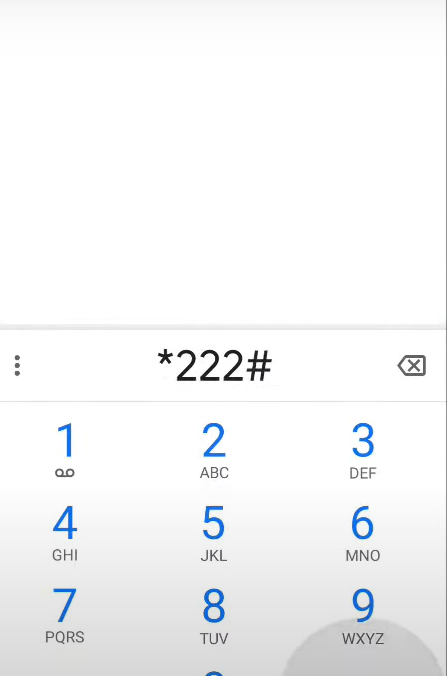
    • Dial *222# and press the call button
    image showing phone dialpad dialing *222#
    Dial this code on your mobile
    • Wait for a few seconds, a pop-up will appear on your screen displaying your balance.
    A popup showing your current zong balance
    Image of a pop-up showing your balance

    Benefits

    • Quick response (typically within 3-6 seconds)
    • You can use it on both the Keypad and smartphones.
    • You don’t need any technical knowledge.

    Alternative: Download My Zong App

    The My Zong App is a comprehensive self-service tool available on the Google Play Store and Apple App Store. It not only helps you check your balance but also gives you control over your mobile account.

    How to Use It:

    1. Download the app on your smartphone.
    2. Log in or sign up using your Zong number.
    3. Your current balance will be displayed on the main dashboard.

    Additional App Features:

    • Manage call, SMS, and internet packages
    • Recharge your balance or pay bills (for postpaid users)
    • View usage history and bonus offers
    • Daily games like “Card Puzzle” to win free MBs
    • Live chat support for assistance

    Also Check: 0370 is which network code

    Zong Helpline 310

    You can also check your remaining balance & history by calling on helpline number 310. A representative member will verify your identity and assist you.

    1. Dial 310 from your Zong SIM.
    2. Select the balance inquiry option or talk to a representative.
    3. The support agent will verify your identity before sharing your balance details.

    Why Is It Important to Check Your Balance Regularly?

    • To avoid sudden disconnections due to low credit
    • Track mobile usage to stay within your monthly budget
    • Monitor deductions to identify unwanted service charges
    • Plan your recharges and subscriptions more efficiently

    Conclusion

    In summary, the balance checking code acts like a helper to quickly check your balance. By dialling *222#, you can quickly check it without any hassle. If you have extra balance in your account, you can secure it with Zong balance save code. In this article, I mentioned three different methods, you can use anyone which is best suitable for you. If you need any additional support or information, contact me through email, and I will give you a solution ASAP.

    Frequently Asked Questions

    Can I use the same code on a Postpaid SIM?

    No, Postpaid customers must use the My Zong mobile App to check their usage history.

    Can I use this code while roaming?

    Yes, the USSD code *222# works even while roaming, subject to network availability.

    Why is it showing that your balance is not enough?

    You must have service charges of Rs. 0.25 to check your balance through the code.

    Related Article: Ufone Balance Check Code

    Follow on Google News Follow on WhatsApp
    Share. WhatsApp Facebook Twitter Tumblr LinkedIn Email
    Previous ArticleZong Balance Save Code 2025 | Free Activation
    Next Article Telenor SIM Lagao Offer Code | Band SIM Offer
    Haroon Rashid
    • Facebook
    • Instagram
    • LinkedIn

    Haroon is a gaming-focused tech enthusiast who breaks down complex updates from games like PUBG, GTA, and The Sims 4 in a clear, easy-to-follow way. He is also the creator of the Wordrix and Wordrix Pro Android games.

    Related Posts

    Telecom

    How to Check Telenor Answers?

    December 16, 2025
    Telecom

    How to Check SIMs on CNIC​ for Free

    November 15, 2025
    Telecom

    Zong Balance Save Code 2025 | Free Activation

    May 15, 2025
    Add A Comment
    Leave A Reply Cancel Reply

    Top Posts

    How to Check Telenor Answers?

    December 16, 2025

    How to Check SIMs on CNIC​ for Free

    November 15, 2025

    Zong Balance Save Code 2025 | Free Activation

    May 15, 2025

    Subscribe to Updates

    Stay updated with the latest gaming news, tutorials, and how-to guides from gamuters.

    Gamuters logo in white color
    Facebook X (Twitter) Pinterest WhatsApp Instagram YouTube

    Popular

    • Android & iOS
    • Windows OS
    • Telecom
    • Mobile Brands
    • The Sims
    • PUBG News
    • Web Stories

    Download

    • The Sims 4
    • PUBG Mobile
    • BGMI
    • Project IGI 1
    • PvZ Fusion
    • Gameloop
    • SnapTube

    Information

    • About Us
    • Contact us
    • Disclaimer
    • Privacy Policy
    • Terms of Service
    • Write for Us
    • Website Sitemap

    Subscribe to Updates

    Stay updated with the latest gaming news, tutorials, and how-to guides from gamuters.

    © 2025 gamuters | All Rights Reserved | Developed by UNIDAC.

    Type above and press Enter to search. Press Esc to cancel.