
Close Menu

    Subscribe to Updates

    Stay updated with the latest gaming news, tutorials, and how-to guides from Gamuters.

    What's Hot
    Image showing stairs in new Sims 4 update Do it for the plot.

    Sims 4’s New Update “Do it for the plot”

    February 5, 2026
    A player playing PUBG with 6x scope using Best Sensitivity

    Best PUBG Mobile Sensitivity for 2026

    January 13, 2026
    Two images of Sims, on the left side he feels bored while on the right side, he feels excited because of Sims 4 challemges

    Sims 4 Challenges (Updates 2026)

    January 11, 2026
    Facebook X (Twitter) YouTube WhatsApp
    Monday, 16th February 2026
    Facebook Telegram X (Twitter) Pinterest
    GamutersGamuters
    • Telecom
    • Download
    • Gaming
      • PUBG Mobile
      • The Sims
    • Contact
    Subscribe
    GamutersGamuters
    Home»Telecom»What is Ufone Balance Check Code
    Telecom

    What is Ufone Balance Check Code

    Haroon RashidBy Haroon RashidJanuary 10, 2026Updated:January 10, 20263 Mins Read
    Share Facebook WhatsApp Twitter Reddit Pinterest Telegram Email
    image showing Ufone Balance Check Code
    easily check your ufone balance

    Ufone is one of Pakistan’s most reliable mobile networks, offering services to millions of prepaid and postpaid users. Whether you’re making calls, browsing the internet, or sending messages, it’s important to keep track of your remaining balance. The easiest way to do this is by dialing the Ufone balance check code *124#, which instantly shows your available credit.

    Quick Takeaways

    1. Use *124# to check your balance (Rs. 0.12 + tax).
    2. Download the My Ufone App to track your subscriptions
    3. Manage your account online through the Ufone Self Care Portal

    Why do you need to check your balance

    Knowing your Ufone balance helps you stay in control, so you’re not caught off guard when you need to make a call, send a text, or use data. It’s a simple way to avoid running out of credit at the wrong time.

    How to Check Ufone Balance?

    There are three possible ways to check it: the first one is through USSD code, the second one is through the Mobile App, and the third one is through the Online portal. Here is the detail of each method:

    Method 1: USSD Code

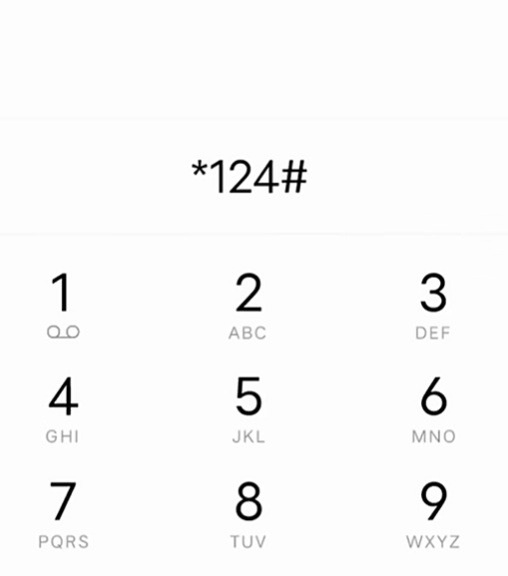
    This is the most straightforward process. Just dial *124# , and your remaining credits will display on your screen. Here is how to do it:

    • Open your phone’s dial pad
    • Dial *124# and press the call button
    Image showing dialpad with *124# code
    dialling *124# from your phone
    • Wait for a few seconds until a pop-up message appears

    (Note: The service charges of Rs 0.12 incl. tax will be deducted from your account.)

    Method 2: My Ufone App

    On May 31, 2013, Ufone introduced its own mobile app, also known as UPTCL. The app allows you to log in with your number and manage your payments, subscriptions, and bills in one place. Furthermore, the app displays your balance on the main dashboard, and it is entirely free.

    1. Download the UPTCL App from the Play Store/App Store
    2. Log in with your registered Ufone mobile number
    3. Your balance will appear on the main home page
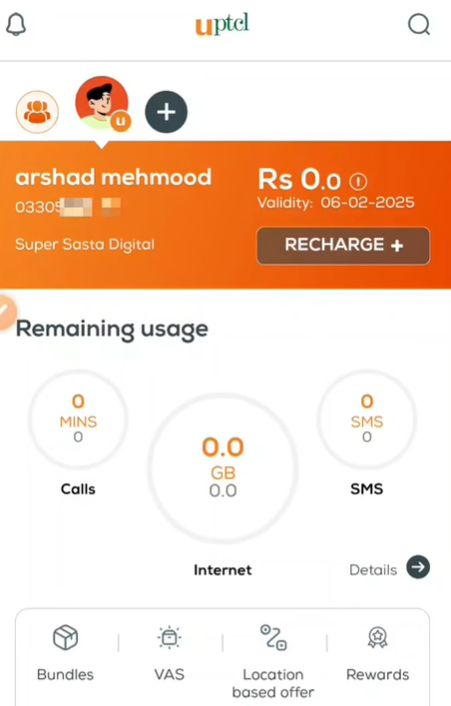
    screenshot of main dashboard of UPTCL showing balance
    Checking Account credits through the UPTCL App

    If you don’t know your number, check out our guide on how to check your Ufone number.

    Method 3: Online Portal

    If you cannot use the above methods, you can still get details about your balance history. Just access the Self-care online portal and log in to your account using your phone number and Password (If you do not have an account, register first), then go to My Account to check your remaining balance.

    Conclusion

    I mentioned all the possible ways to check your balance, from dialling a code to downloading the My Ufone app. You can subscribe to a package according to your available balance. After that, you can secure your remaining credits with the Ufone balance saver so that you can use them later. If you are still facing issues regarding this concern, call the helpline number 333.

    FAQs

    Can I check Ufone balance while roaming?

    Yes, the *124# code typically works internationally, but charges may apply depending on the country and roaming agreement.

    Is there a free method to check the Ufone balance?

    Yes, using the My Ufone App or the online portal is completely free.

    How do I check the balance of another Ufone number?

    You cannot check someone else’s balance unless you have access to their account or device.

    Follow on Google News Follow on WhatsApp
    Share. WhatsApp Facebook Twitter Tumblr LinkedIn Email
    Previous Article0370 Which Network Code in Pakistan
    Next Article Zong Balance Save Code | Free Activation
    Haroon Rashid
    • Facebook
    • Instagram
    • LinkedIn

    Haroon is a gaming-focused tech enthusiast who breaks down complex updates from games like PUBG, GTA, and The Sims 4 in a clear, easy-to-follow way. He is also the creator of the Wordrix and Wordrix Pro Android games.

    Related Posts

    Telenor SIM with packaging box
    Telecom

    How to Check Telenor Answers?

    December 16, 2025
    Image showing three sims and text "Check SIM Ownership Details"
    Telecom

    How to Check SIMs on CNIC​ for Free

    January 10, 2026
    A zong logo with text showing Zong Loan Code
    Telecom

    Zong Advance Code 2026 | Get Free Loan

    January 10, 2026
    Add A Comment
    Leave A Reply Cancel Reply

    Top Posts
    Telenor SIM with packaging box

    How to Check Telenor Answers?

    December 16, 2025
    Image showing three sims and text "Check SIM Ownership Details"

    How to Check SIMs on CNIC​ for Free

    January 10, 2026
    A zong logo with text showing Zong Loan Code

    Zong Advance Code 2026 | Get Free Loan

    January 10, 2026

    Subscribe to Updates

    Stay updated with the latest gaming news, tutorials, and how-to guides from gamuters.

    Gamuters logo in white color
    Facebook X (Twitter) Pinterest WhatsApp Instagram YouTube

    Popular

    • Telecom
    • The Sims
    • PUBG Mobile
    • Cheat Codes
    • Puzzle Game
    • Grand Theft Auto

    Download

    • The Sims 4
    • PUBG Mobile
    • BGMI
    • Project IGI 1
    • PvZ Fusion
    • Gameloop
    • SnapTube

    Information

    • About Us
    • Contact us
    • Disclaimer
    • Privacy Policy
    • Terms of Service
    • Write for Us
    • Website Sitemap

    Subscribe to Updates

    Stay updated with the latest gaming news, tutorials, and how-to guides from gamuters.

    © 2026 gamuters | All Rights Reserved | Developed by UNIDAC.

    Type above and press Enter to search. Press Esc to cancel.