


Close Menu

    Subscribe to Updates

    Stay updated with the latest gaming news, tutorials, and how-to guides from Gamuters.

    What's Hot
    Image showing stairs in new Sims 4 update Do it for the plot.

    Sims 4’s New Update “Do it for the plot”

    February 5, 2026
    A player playing PUBG with 6x scope using Best Sensitivity

    Best PUBG Mobile Sensitivity for 2026

    January 13, 2026
    Two images of Sims, on the left side he feels bored while on the right side, he feels excited because of Sims 4 challemges

    Sims 4 Challenges (Updates 2026)

    January 11, 2026
    Facebook X (Twitter) YouTube WhatsApp
    Monday, 16th February 2026
    Facebook Telegram X (Twitter) Pinterest
    GamutersGamuters
    • Telecom
    • Download
    • Gaming
      • PUBG Mobile
      • The Sims
    • Contact
    Subscribe
    GamutersGamuters
    Home»Telecom»How to Check SIMs on CNIC​ for Free
    Telecom

    How to Check SIMs on CNIC​ for Free

    Haroon RashidBy Haroon RashidJanuary 10, 2026Updated:January 10, 20263 Mins Read
    Share Facebook WhatsApp Twitter Reddit Pinterest Telegram Email
    Image showing three sims and text "Check SIM Ownership Details"

    If you have a National Identity Card in Pakistan, you should always keep track of how many SIMs are registered under your CNIC. Sometimes, when you buy a SIM from an unverified retailer, they might save your fingerprints and register additional SIMs without your knowledge. These can end up in the hands of scammers or other criminals. Here’s how you can check the SIMs linked to your CNIC for free. You can send an SMS or visit the official PTA website to see the full details.

    Why Should You Check Your Registered SIMs?

    • Prevent Identity Theft: Unauthorized SIMs can be used for fraudulent activities under your name
    • Avoid Legal Issues: Criminal activities using your registered SIMs could lead to legal complications
    • Protect Financial Security: Scammers might use unauthorized SIMs to access your banking information
    • Maintain Control: Keep track of all active connections linked to your identity.

    2 Ways to check your SIMs registered on your CNIC

    Method 1: Check via SMS

    This is the quickest and most popular method that works on both Keypads and Smartphones. The PTA has a dedicated short code, 668, for this purpose.

    1. Open the SMS (text message) app on your mobile phone.
    2. In the recipient field, type 668.
    3. In the message body, type your 13-digit CNIC number without any dashes or spaces. (e.g., 35101xxxxxxxx).
    4. Send the message.
    5. You will shortly receive a reply from 668. This message will show a list of all mobile operators (Jazz, Telenor, Zong, Ufone) and the total count of SIMs registered to your CNIC for each one.

    Note: For privacy reasons, this service will only show you the count of SIMs, not the actual mobile numbers.

    Method 2: Check via PTA Website

    You can also perform this check online through the official PTA portal. This is useful if you don’t have your phone or want to check from a computer.

    1. Go to the official PTA website cnic.sims.pk.
    2. On the page, you will see a box asking for your CNIC.
    3. Enter your 13-digit CNIC number in the field and solve the captcha.
    4. Click the “Submit” or “Check” button.
    5. The website will display a table showing the total number of SIMs registered on your CNIC, with a breakdown by each mobile operator (Jazz, Telenor, Zong, Ufone, Warid).
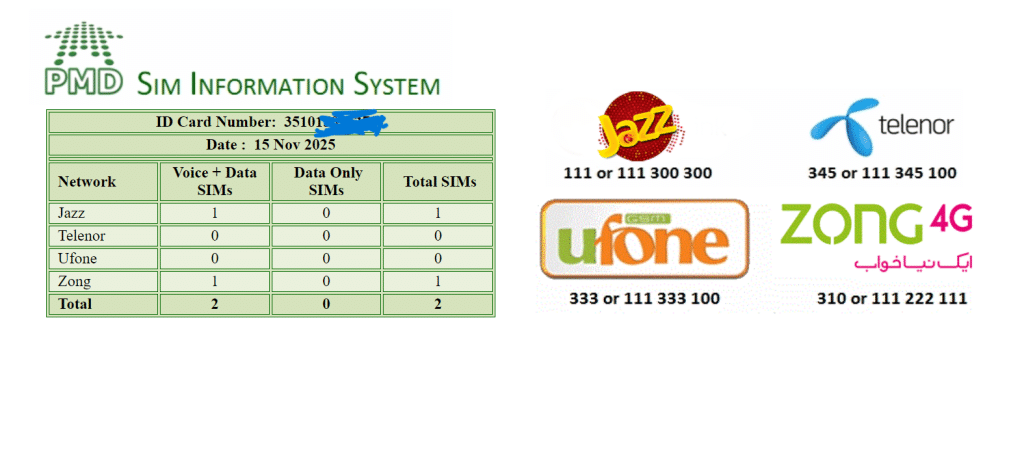
    Table showing registed SIMS on each operator

    What to Do If You Find an Unknown SIM on Your CNIC?

    After checking, you might find a SIM (or multiple SIMs) listed under an operator you’ve never used. In that case, take your original ID card and visit the SIM operator’s franchise and ask them to block it immediately.

    Conclusion

    Keeping track of the SIMs registered on your CNIC is an easy way to protect your identity and avoid serious issues. The methods above let you check your status quickly, whether through SMS or the PTA website. If you find anything suspicious or need extra help, reach out to the official PTA support team for guidance.

    Follow on Google News Follow on WhatsApp
    Share. WhatsApp Facebook Twitter Tumblr LinkedIn Email
    Previous ArticlePUBG Mobile 4.1 Update APK download links for all versions | GL, KR, VN, TW
    Next Article Sims 4’s Mod UI Cheats Extension v1.51 is out!
    Haroon Rashid
    • Facebook
    • Instagram
    • LinkedIn

    Haroon is a gaming-focused tech enthusiast who breaks down complex updates from games like PUBG, GTA, and The Sims 4 in a clear, easy-to-follow way. He is also the creator of the Wordrix and Wordrix Pro Android games.

    Related Posts

    Telenor SIM with packaging box
    Telecom

    How to Check Telenor Answers?

    December 16, 2025
    A zong logo with text showing Zong Loan Code
    Telecom

    Zong Advance Code 2026 | Get Free Loan

    January 10, 2026
    image of a man holding a sim showing
    Telecom

    Telenor SIM Lagao Offer Code | Band SIM Offer

    January 3, 2026
    Add A Comment
    Leave A Reply Cancel Reply

    Top Posts
    Telenor SIM with packaging box

    How to Check Telenor Answers?

    December 16, 2025
    A zong logo with text showing Zong Loan Code

    Zong Advance Code 2026 | Get Free Loan

    January 10, 2026
    image of a man holding a sim showing

    Telenor SIM Lagao Offer Code | Band SIM Offer

    January 3, 2026

    Subscribe to Updates

    Stay updated with the latest gaming news, tutorials, and how-to guides from gamuters.

    Gamuters logo in white color
    Facebook X (Twitter) Pinterest WhatsApp Instagram YouTube

    Popular

    • Telecom
    • The Sims
    • PUBG Mobile
    • Cheat Codes
    • Puzzle Game
    • Grand Theft Auto

    Download

    • The Sims 4
    • PUBG Mobile
    • BGMI
    • Project IGI 1
    • PvZ Fusion
    • Gameloop
    • SnapTube

    Information

    • About Us
    • Contact us
    • Disclaimer
    • Privacy Policy
    • Terms of Service
    • Write for Us
    • Website Sitemap

    Subscribe to Updates

    Stay updated with the latest gaming news, tutorials, and how-to guides from gamuters.

    © 2026 gamuters | All Rights Reserved | Developed by UNIDAC.

    Type above and press Enter to search. Press Esc to cancel.