



Close Menu

    Subscribe to Updates

    Stay updated with the latest gaming news, tutorials, and how-to guides from Gamuters.

    What's Hot
    Image showing stairs in new Sims 4 update Do it for the plot.

    Sims 4’s New Update “Do it for the plot”

    February 5, 2026
    A player playing PUBG with 6x scope using Best Sensitivity

    Best PUBG Mobile Sensitivity for 2026

    January 13, 2026
    Two images of Sims, on the left side he feels bored while on the right side, he feels excited because of Sims 4 challemges

    Sims 4 Challenges (Updates 2026)

    January 11, 2026
    Facebook X (Twitter) YouTube WhatsApp
    Thursday, 19th February 2026
    Facebook Telegram X (Twitter) Pinterest
    GamutersGamuters
    • Telecom
    • Download
    • Gaming
      • PUBG Mobile
      • The Sims
    • Contact
    Subscribe
    GamutersGamuters
    Home»Gaming»The Sims»How to Freely Rotate Items/Objects in Sims 4
    The Sims

    How to Freely Rotate Items/Objects in Sims 4

    Haroon RashidBy Haroon RashidFebruary 17, 2026Updated:February 17, 20264 Mins Read
    Share Facebook WhatsApp Twitter Reddit Pinterest Telegram Email
    image showing How to Freely Rotate Items in Sims 4
    Move objects freely in Sims 4

    The Sims 4 has maintained its reputation for over a decade, especially when it comes to building modern homes. You need to collect items, manage them, and place them in specific directions to design the best possible setup. However, most people donโ€™t know how to rotate items or objects using the mouse or keyboard. So, in this guide, Iโ€™ll show you how to rotate them in The Sims 4.

    Quick TakeAway

    1. Rotate objects freely or 45 degrees on PC & Consoles.
    2. On PC, press Period or Comma to rotate items Left & Right.
    3. On Xbox, Press RB to rotate right & LB to rotate left after selecting the object.
    4. For PS, select the object, then use R1 & L1 to rotate right and left.

    How to Rotate Items in Sims 4

    There are two different ways to rotate items/objects. With the first one, you can rotate anything at a 45-degree angle, e.g, right and left. In the second method, you can freely move any object. It is helpful when you want to place the item at a specific angle. Here are details of each method, learn them to become a Pro Builder.

    Video tutorial showing how to rotate items in The Sims 4

    1) Rotating Item with 45ยฐ Angle

    Image shwoing 45 degree rotation of items
    Rotate objects at 45 45-degree Angle

    This is called locked rotation because it can rotate the item at a 45-degree angle, like right or left. It is most commonly used by those players who want some basic changes. Keep in mind that for this rotation, you must be in Build Mode and drag the item that you want to move. Here is how you can move items with a 45ยฐ Angle in The Sims 4 on PC, MAC, Xbox, and PlayStation.

    PC & MAC

    • Press the Comma (,) to rotate left, while the Period (.) to rotate right.
    • Click and hold the object, then glide your cursor around it to pivot or adjust its angle.

    Xbox

    • Pick the object you want to rotate, then tap RB to rotate it right or LB to turn it left.

    PlayStation

    • Choose the object, then press R1 to rotate it right or R2 to spin it left.

    2) Freely Rotating Item
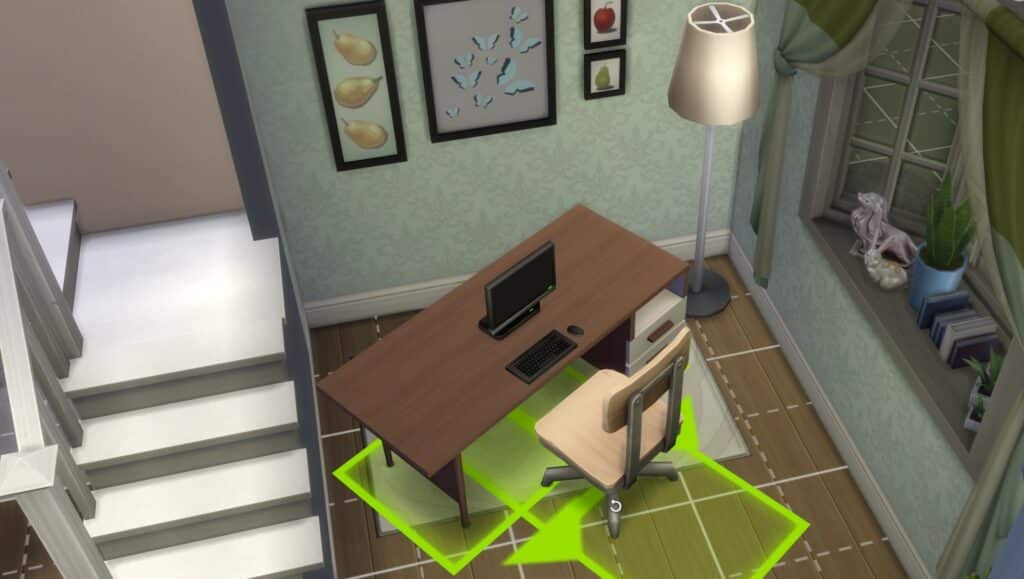
    image showing freely rotating items in Sims 4
    Freely rotate items in Sims 4

    You can also freely rotate items in Sims 4. This method is convenient when you want to put them at a specific angle other than 45 degrees. It gives you full creative freedom to design more natural and realistic layouts.

    PC & MAC

    Click and hold the object you want to move, then press and hold the Alt key. While holding it, move your mouse around to rotate the object exactly how you want with no angle limits.

    Xbox

    Select your object, hold down LB + RB, and then use the right analog stick to spin it smoothly in any direction.

    PlayStation

    Choose the object, then hold down L1 + R1 together. Use the right analog stick to rotate it freely and place it at any custom angle.

    Note: Free rotation is only available when you’re in Build Mode. You wonโ€™t be able to use this feature in Live Mode or Create-A-Sim. Once you’re in Build Mode, though, it unlocks the ability to rotate objects at any angle, giving you more creative freedom with placement and design.

    Conclusion

    Rotating items in The Sims 4 is simple once you know the right controls for your platform. Whether you prefer the quick 45-degree turns or want full control with free rotation, Build Mode gives you all the tools you need to customize your space exactly how you want. These rotation methods are fully supported in the latest 2025 update, and they work smoothly on both PC and consoles.

    If you’re using mods like More CAS Columns or other UI-altering mods, you might experience occasional glitches with object placement. In that case, try disabling the mod or updating it to the latest version.

    If you are building homes, do not forget to share your beautiful designs with us. Happy Gaming!

    Follow on Google News Follow on WhatsApp
    Share. WhatsApp Facebook Twitter Tumblr LinkedIn Email
    Previous ArticleMore CAS Columns Sims 4 v1.36 (Updated 2026)
    Next Article Sims 4 More CAS Traits Mod v2c
    Haroon Rashid
    • Facebook
    • Instagram
    • LinkedIn

    Haroon is a gaming-focused tech enthusiast who breaks down complex updates from games like PUBG, GTA, and The Sims 4 in a clear, easy-to-follow way. He is also the creator of the Wordrix and Wordrix Pro Android games.

    Related Posts

    Image showing stairs in new Sims 4 update Do it for the plot.
    The Sims

    Sims 4’s New Update “Do it for the plot”

    February 5, 2026
    Two images of Sims, on the left side he feels bored while on the right side, he feels excited because of Sims 4 challemges
    The Sims

    Sims 4 Challenges (Updates 2026)

    January 11, 2026
    Image showing Anadius Sims 4 updater and DLC unlocker
    The Sims

    Anadius Retires from The Sims 4 Community!

    January 30, 2026
    View 2 Comments

    2 Comments

    1. Khoras on August 2, 2025 11:01 PM

      The solution for freely rotating on XBox is wrong! It’s LB + RB (NOT LT) +right analog stick.

      Reply
      • Haroon Rashid on August 3, 2025 8:17 PM

        Thanks, Now its correct

        Reply
    Leave A Reply Cancel Reply

    Top Posts
    Image showing stairs in new Sims 4 update Do it for the plot.

    Sims 4’s New Update “Do it for the plot”

    February 5, 2026
    Two images of Sims, on the left side he feels bored while on the right side, he feels excited because of Sims 4 challemges

    Sims 4 Challenges (Updates 2026)

    January 11, 2026
    Image showing Anadius Sims 4 updater and DLC unlocker

    Anadius Retires from The Sims 4 Community!

    January 30, 2026

    Subscribe to Updates

    Stay updated with the latest gaming news, tutorials, and how-to guides from gamuters.

    Gamuters logo in white color
    Facebook X (Twitter) Pinterest WhatsApp Instagram YouTube

    Popular

    • Telecom
    • The Sims
    • PUBG Mobile
    • Cheat Codes
    • Puzzle Game
    • Grand Theft Auto

    Download

    • The Sims 4
    • PUBG Mobile
    • BGMI
    • Project IGI 1
    • PvZ Fusion
    • Gameloop
    • SnapTube

    Information

    • About Us
    • Contact us
    • Disclaimer
    • Privacy Policy
    • Terms of Service
    • Write for Us
    • Website Sitemap

    Subscribe to Updates

    Stay updated with the latest gaming news, tutorials, and how-to guides from gamuters.

    © 2026 gamuters | All Rights Reserved | Developed by UNIDAC.

    Type above and press Enter to search. Press Esc to cancel.