




From 5 November 2025, Krafton officially starts rolling out the new update on Android devices. According to the schedule, all iOS devices will receive it on November 6. Here, I will give you links to the PUBG Mobile 4.1 update APK for Global, Korean, and Vietnamese versions.
PUBG 4.1 Update Download Links
PUBG Global
- Play Store: https://play.google.com/store/apps/details?id=com.tencent.ig&hl=en&pli=1
- APK: https://download.gamuters.com/pubg-mobile/
PUBG KR
- Play Store: https://play.google.com/store/apps/details?id=com.pubg.krmobile&hl=en
- APK: https://download.gamuters.com/pubg-mobile-kr/
PUBG VN
- Play Store: https://play.google.com/store/apps/details?id=com.vng.pubgmobile&hl=en
- APK: https://download.gamuters.com/pubg-mobile-vn/
PUBG TW
- Play Store: https://play.google.com/store/apps/details?id=com.rekoo.pubgm&hl=en
- APK: https://download.gamuters.com/pubg-mobile-tw/
Always download the game from the Play Store or trusted websites like APKPure or TapTap. The APK file size is approximately 1.2 GB, so prepare your device and make sure you have enough space on it.
How to install/update the game?
After downloading the file, follow the steps below to install or update an existing game.
- Open your device’s Downloads folder and locate the APK file you just saved.
- Tap the file, and if prompted, enable “Install from Unknown Sources” to continue.
- Next, tap Scan and Proceed with Installation to let your device verify the app.
- Once the installation completes, open the game and grant the required microphone and storage permissions.
- After that, download the essential resource and graphics packs to ensure smooth gameplay.
- Sign in with your preferred method — Email, Facebook, Twitter, or phone number.
- Finally, download the latest maps and character skins, and dive into the upgraded gaming experience.
What’s New
The PUBG Mobile 4.1 update brings a fresh wave of excitement with the new Frosty Funland theme. The battlegrounds are now covered in snow, and players can explore two new event zones, including the lively Penguinville, packed with exclusive loot and seasonal challenges. To move around faster, you can glide using Magic Ice Skates or hop into the Penguin Cart, an amphibious vehicle that drives smoothly across land, water, and ice.
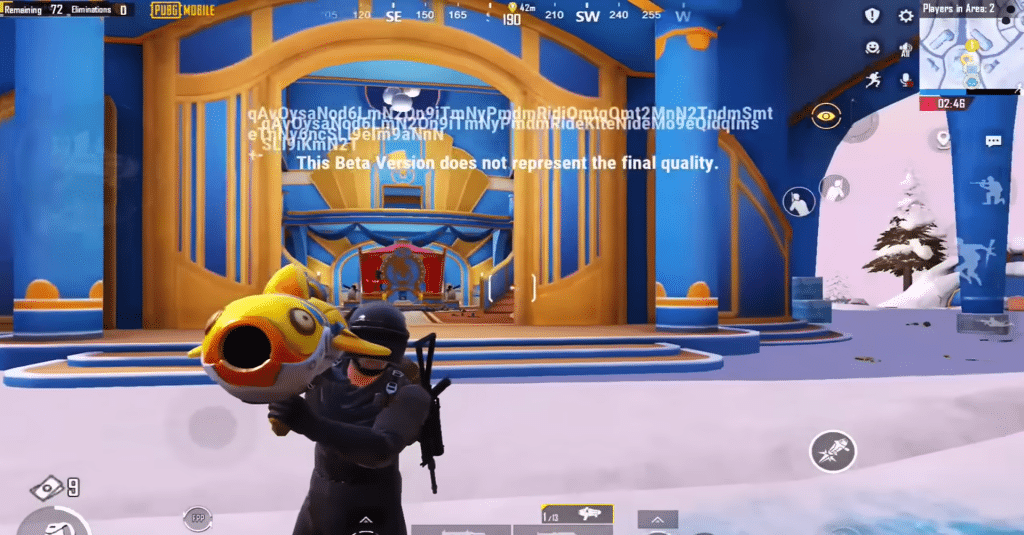
This update also introduces PonWin, a samurai-style penguin companion who can revive teammates and provide in-game support. On top of that, PUBG Mobile adds fun new weapons like the Salted Fish Rocket Launcher and a frosty Kar98k rifle that can slow down or freeze enemies. A handy new feature lets you carry enemy loot crates to safer spots instead of looting in open areas, which adds a clever layer of strategy to the game.
Weapon balance has also been fine-tuned—DMRs now feel stronger and more stable, while shotguns have been slightly toned down to keep matches fair. The update even improves the game’s visuals and sound effects, making the icy world feel more realistic and immersive. Overall, the PUBG Mobile 4.1 update blends fun, creativity, and strategy perfectly, giving players a fresh reason to jump back into the action.
